CloudWatch Integration
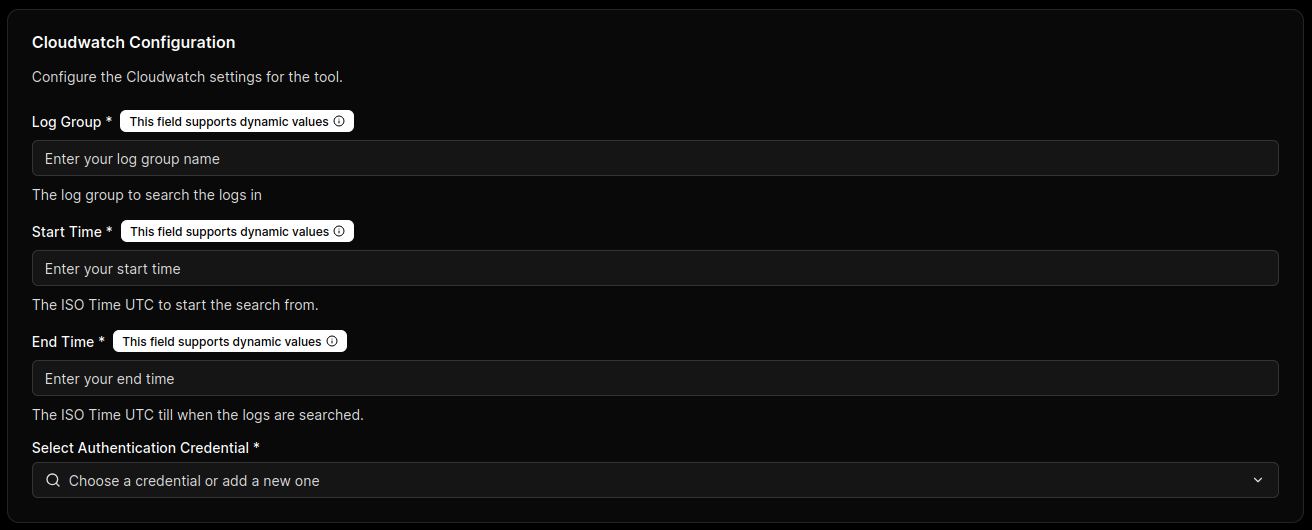
Configure CloudWatch connectivity so MCP Express can perform a secure handshake with AWS and validate runtime query execution settings. This process establishes authenticated access to log data while keeping query scope explicit.
Connection Parameters
| Parameter | Technical Description | Required |
|---|---|---|
| Log Group | CloudWatch log group path to query; supports runtime templating with {{ }}. | Yes |
| Start Time | ISO UTC start timestamp for query scope; supports runtime templating with {{ }}. | Yes |
| End Time | ISO UTC end timestamp for query scope; supports runtime templating with {{ }}. | Yes |
| AWS Access Key | Access key ID used to sign CloudWatch API requests. | Yes |
| AWS Secret Key | Secret key paired with the access key ID for authenticated request signing. | Yes |
| Region | AWS region that hosts the target CloudWatch log groups (for example, us-east-1). | Yes |
Scope and Cost Control
Unbounded time ranges or broad log group patterns can increase cost and latency. Always constrain Log Group, Start Time, End Time, and Query.
Be cautious with {{ }} placeholders—treat inputs as untrusted. Enforce allowlists, bounded limits, and restricted log group scopes to prevent excessive query expansion and unpredictable costs.
Use Least-Privilege IAM Credentials
Use AWS credentials limited to required CloudWatch Logs Insights actions and approved log resources only.
Handshake & Capability Discovery
- Credential Validation: MCP Express verifies Region plus AWS key pair validity against CloudWatch APIs.
- Query Scope Readiness: The connector confirms Log Group and time-bound query parameters can be resolved for execution.
- Tool Contract Initialization: MCP Express prepares callable tool contracts for templated Logs Insights query execution.