CloudWatch Integration
The CloudWatch integration connects MCP Express to Amazon CloudWatch Logs Insights so tools can execute scoped log queries through consistent JSON-RPC contracts. It supports static and templated query inputs while preserving operational controls for production workloads.
Capabilities
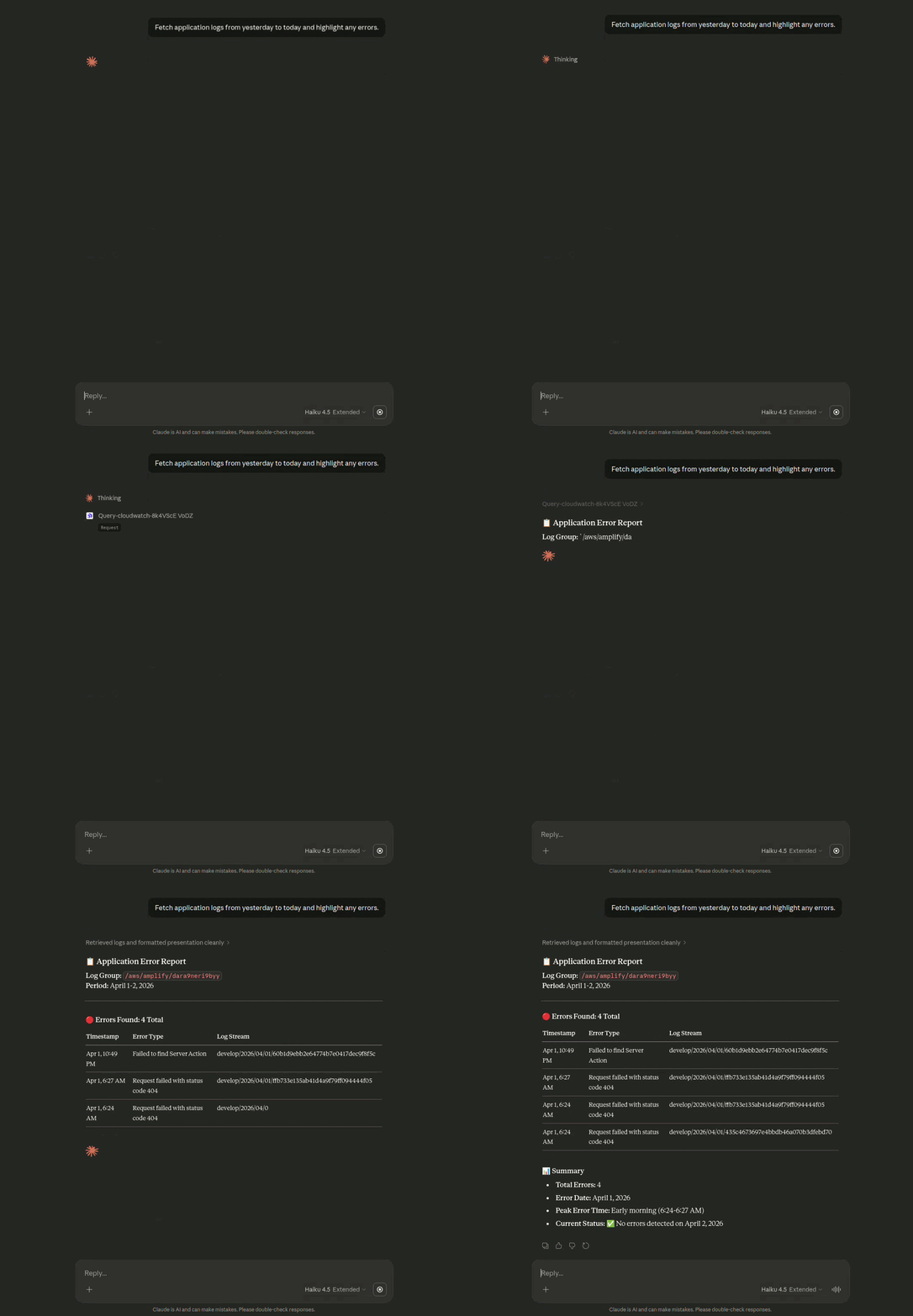
- Logs Insights Query Execution: Run CloudWatch Logs Insights queries against approved log groups and time windows.
- Templated Runtime Inputs: Parameterize Log Group, Start Time, End Time, and Query fields with validated
{{ }}variables. - Cost-Aware Query Controls: Bound result volume with query limits and constrained time ranges.
- Secure AWS Access: Authenticate with AWS Access Key and AWS Secret Key stored through protected integration credentials.
Integration
Configure CloudWatch connectivity so MCP Express can perform a secure handshake with AWS and validate runtime query execution settings. This process establishes authenticated access to log data while keeping query scope explicit.
Connection Parameters
| Parameter | Technical Description | Required |
|---|---|---|
| Log Group | CloudWatch log group path to query; supports runtime templating with {{ }}. | Yes |
| Start Time | ISO UTC start timestamp for query scope; supports runtime templating with {{ }}. | Yes |
| End Time | ISO UTC end timestamp for query scope; supports runtime templating with {{ }}. | Yes |
| AWS Access Key | Access key ID used to sign CloudWatch API requests. | Yes |
| AWS Secret Key | Secret key paired with the access key ID for authenticated request signing. | Yes |
| Region | AWS region that hosts the target CloudWatch log groups (for example, us-east-1). | Yes |
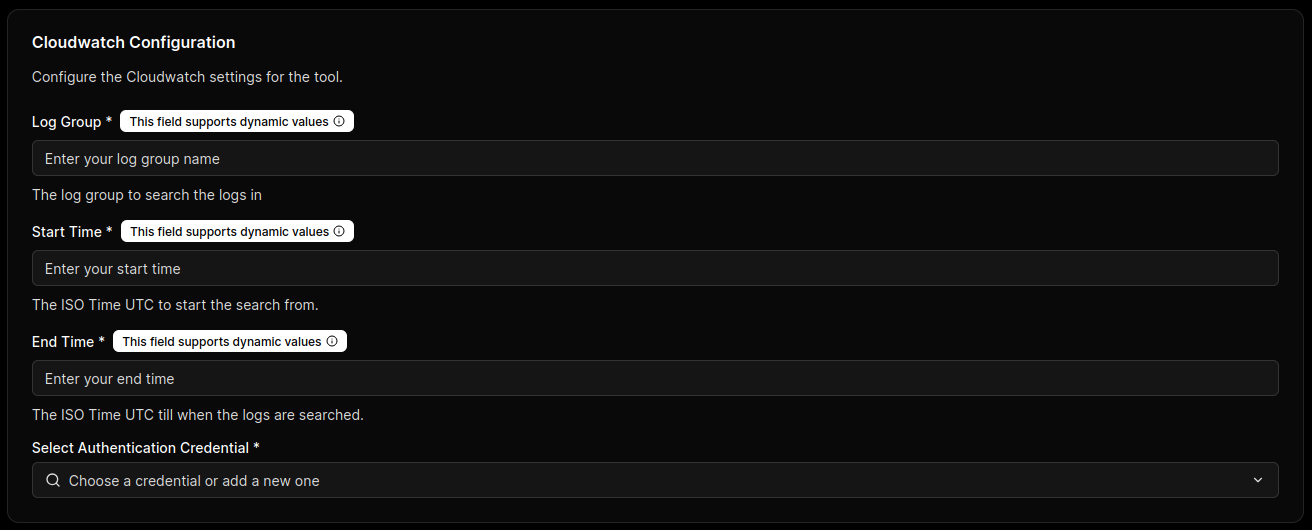
Unbounded time ranges or broad log group patterns can increase cost and latency. Always constrain Log Group, Start Time, End Time, and Query.
Be cautious with {{ }} placeholders—treat inputs as untrusted. Enforce allowlists, bounded limits, and restricted log group scopes to prevent excessive query expansion and unpredictable costs.
Use AWS credentials limited to required CloudWatch Logs Insights actions and approved log resources only.
Handshake & Capability Discovery
- Credential Validation: MCP Express verifies Region plus AWS key pair validity against CloudWatch APIs.
- Query Scope Readiness: The connector confirms Log Group and time-bound query parameters can be resolved for execution.
- Tool Contract Initialization: MCP Express prepares callable tool contracts for templated Logs Insights query execution.
Configuration
Configuration maps CloudWatch query behavior into callable MCP tools so runtime prompts produce validated, bounded log operations. In this step, you configure only the Logs Insights Query field; Region, credentials, Log Group, Start Time, and End Time are defined in the Integration setup.
Tool Orchestration
CloudWatch uses a single action-oriented setup where one tool executes a Logs Insights query within the connection scope already set in Integration.
Configuration Setup
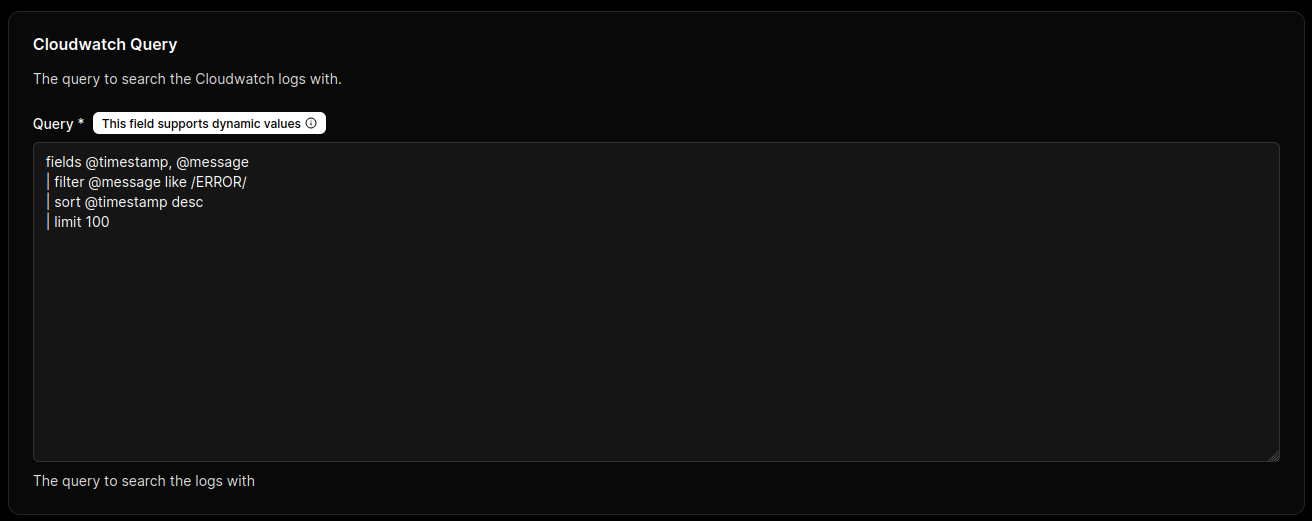
Define the execution template for Query so MCP Express can safely resolve runtime inputs.
How It Works
- Set a fixed query or use
{{ }}template variables insideQuery. - Bind query template variables to the tool input schema (for example,
keyword,limit). - Validate query behavior with representative runtime payloads before enabling the tool.
- Confirm result size and execution time stay within operational limits for the Integration-level Log Group and time window.
Supported Actions
- Execute Logs Insights Query: Runs the configured CloudWatch Logs Insights query against the resolved log group and time range.
Query Modes
Use one of the following query modes in the Query field.
Static Query
Use a fixed query when the same diagnostic always runs with identical logic.
fields @timestamp, @message
| filter @message like /ERROR/
| sort @timestamp desc
| limit 100
Templated Query
Use {{ }} placeholders when the tool should accept runtime values from the input schema.
fields @timestamp, @message
| filter @message like /{{keyword}}/
| sort @timestamp desc
| limit {{limit}}
Example configuration object:
{
  "Query": "fields @timestamp, @message | filter @message like /{{keyword}}/ | sort @timestamp desc | limit {{limit}}"
}
Unbounded {{ }} inputs can generate expensive query paths (for example, very high limit values, broad filter patterns, or weakly constrained time windows). This can increase scanned log volume, response latency, and CloudWatch cost.
{{ }} Safe for Production UseTemplated queries are appropriate when connector safeguards are enforced: variable validation, allowlisted patterns, bounded limit, fixed or constrained log groups, and strict Start Time/End Time ranges. With these controls, runtime flexibility is preserved while cost and scope remain predictable.
CloudWatch Logs Insights Query Syntax
Use the official AWS documentation as the source of truth when composing or validating query statements:
- CloudWatch Logs Insights Query Syntax - Complete reference for query commands, functions, and operators
- Sample Queries - Real-world query examples for common scenarios
- Analyze Log Data with Logs Insights - Guide to using Logs Insights for log analysis, including query composition and best practices
Common Query Commands
fields: Select fields to include in output.filter: Apply conditions to reduce result scope.sort: Order results by one or more fields.limit: Restrict returned row count.stats: Compute aggregates over filtered records.parse: Extract structured values from log text.
Common Query Functions
like: Pattern match with wildcard behavior.=~and!~: Regular expression include/exclude matching.avg(),sum(),min(),max(),count(): Aggregate functions for statistics.earliest(),latest(): Time-oriented aggregation helpers.
Governance Controls
- Restrict query template variables to approved patterns (for example, whitelisted filter terms and bounded
limitvalues). - Require explicit
limitusage to prevent excessive result sets. - Keep Log Group and time-range scope fixed at Integration level, and allow only query-level variation at configuration time.
Test static and templated query paths with known payloads to verify variable substitution, timeout behavior, and predictable result size.
Security & Patterns
Use these controls to run CloudWatch-backed MCP tools safely in production. The goal is to preserve read-only observability access, bounded query behavior, and consistent governance over log data exposure.
Guardrails & Restricted Operations
Restrict CloudWatch tools to approved log groups, bounded time ranges, and read-only Logs Insights execution. Keep query templates deterministic enough to prevent expensive or unauthorized access paths.
Allowing unconstrained runtime query construction can expose sensitive log data, scan excessive volumes, and trigger unplanned CloudWatch costs. Enforce strict validation and parameter allowlists before execution.
Runtime note: In this integration, {{ }} placeholders are the dynamic input mechanism. Any value injected through {{ }} is part of runtime query execution and must be treated as untrusted input.
Fully Dynamic AI Operations
Dynamic mode allows the model to shape query statements at runtime from prompt context. This can improve investigative flexibility but increases the risk of broad data access and unstable performance.
Scope distinction:
- Templated Dynamic Queries: The base query is fixed, but specific values are injected through
{{ }}placeholders. - Fully Dynamic Queries: The model can construct large portions of the query structure at runtime.
Only enable dynamic query behavior when IAM scope, input validation, log group allowlists, timeout caps, and output redaction controls are fully enforced.
Data Governance & Scopes
- Apply least-privilege IAM policies scoped to required CloudWatch Logs Insights actions and specific log groups.
- Enforce approved log group prefixes and disallow wildcard expansion that broadens tenant or environment boundaries.
- Validate
Start TimeandEnd Timeranges to prevent excessive historical scans. - Redact or transform sensitive log fields before sending results to downstream model context.
- Audit query templates and runtime variable inputs to maintain traceability for operational reviews.
Performance Optimization
| Pattern | Description | Benefit |
|---|---|---|
| Narrow Time Windows | Keep Start Time and End Time tightly bounded per use case. | Reduces scanned log volume and improves response latency. |
| Query-Level Limits | Require explicit limit clauses in query templates. | Controls payload size and lowers query cost. |
| Early Filtering | Filter on service, severity, or request markers near the start of the query. | Minimizes downstream processing and result noise. |
| Reusable Templates | Standardize vetted query templates for common diagnostics. | Improves consistency and reduces runtime query errors. |
Protocol Limitations
- CloudWatch Logs Insights is read-oriented; it does not support data mutation workflows.
- Very large log scans can exceed acceptable conversational latency budgets.
- Query performance varies with log volume, field extraction complexity, and time window width.
- Logs Insights output shape can vary by query, so tool consumers should enforce output validation.