Confluence Integration Guide
The Confluence Tool integrates with Confluence, a collaboration software developed by Atlassian, allowing you to automate workflows, search for pages, read content, and create or update pages directly from the MCP-Express platform. This integration enhances productivity by streamlining interactions with Confluence content and automating content management.
Configuration
Authentication Parameters
| Parameter | Required | Description |
|---|---|---|
| OAuth 2.0 Authentication | Yes | Secure authentication via OAuth 2.0 |
Setting Up Confluence Tool Integration
-
Select Confluence Tool Integration: In your MCP server dashboard, choose "Confluence" from the available integrations.
-
Authenticate: Click the "Connect Confluence" button to authenticate the app using OAuth 2.0. You will be redirected to Confluence for the authorization process.
-
Choose Subtool: Choose the subtool (Search, Read, Write) you want to use.
-
Test Tool: Use the built-in Test Tool to simulate and verify the integration's functionality with Confluence, ensuring that all actions (search, read, write) are working as expected.
OAuth Integration
The Confluence Tool uses OAuth 2.0 for secure authentication, allowing seamless integration with Confluence without requiring you to manually enter credentials.
Authentication Process
-
Click the "Authenticate" Button: In the MCP-Express app, click the "Connect Confluence" button to start the authentication process.
-
Grant Permissions: You will be redirected to Confluence, where you need to grant the app permission to access your Confluence data. This is a one-time process.
-
Automatic Authentication: Once authenticated, the tool will handle the connection automatically, so you don’t have to manually enter any credentials.

Subtools
Search Tool
The Search Tool uses Confluence Query Language (CQL) for powerful content filtering. For detailed CQL syntax, refer to:
- CQL Syntax Reference - Complete CQL documentation
- Advanced Searching - Advanced search techniques
Configuration Parameters:
| Parameter | Description |
|---|---|
search_query | The search query using Confluence Query Language (CQL) for filtering and sorting content. |
limit | The maximum number of results to return. |
Example Usage:
-
Search for pages containing the word "API":
type:page AND title:"API"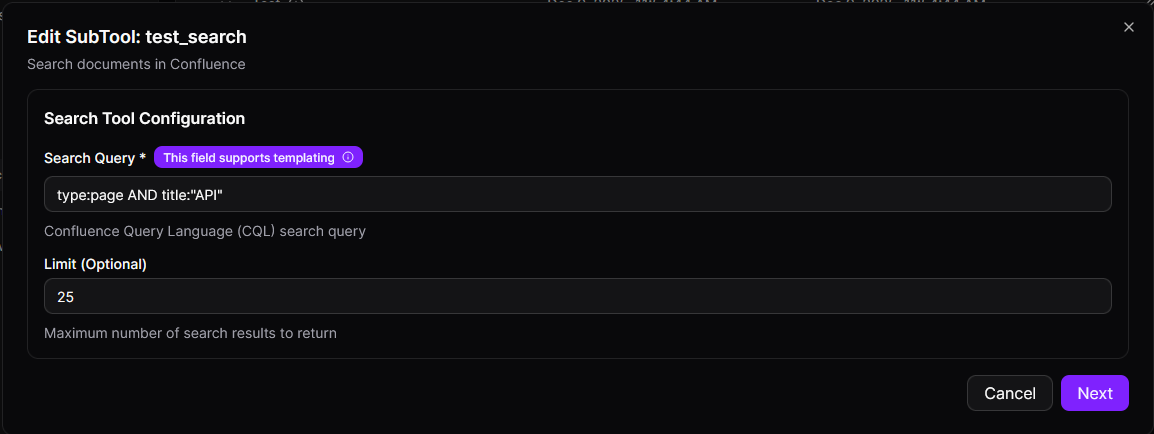
Read Tool
The Read Tool allows you to retrieve the content of a specific Confluence page.
Configuration Parameters:
| Parameter | Description |
|---|---|
page_id | The ID of the Confluence page to read. |
Example Usage:
-
Read the content of page with ID
12345:Read the content of page with ID: 12345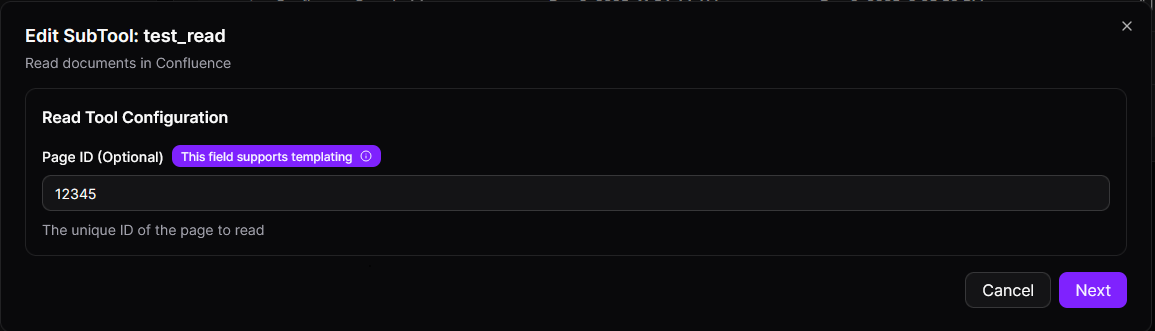
Write Tool
The Write Tool allows you to create or update pages in Confluence.
Configuration Parameters:
| Parameter | Description |
|---|---|
space_key | The key of the space where the page will be created or updated. |
parent_id | The ID of the parent page if the page is nested. |
page_title | The title of the page to create or update. |
page_content | The content of the page to create or update. |
Example Usage:
-
Create or update a page titled "New API Documentation":
space_key: "dev"
page_title: "New API Documentation"
page_content: "Detailed information about the new API features."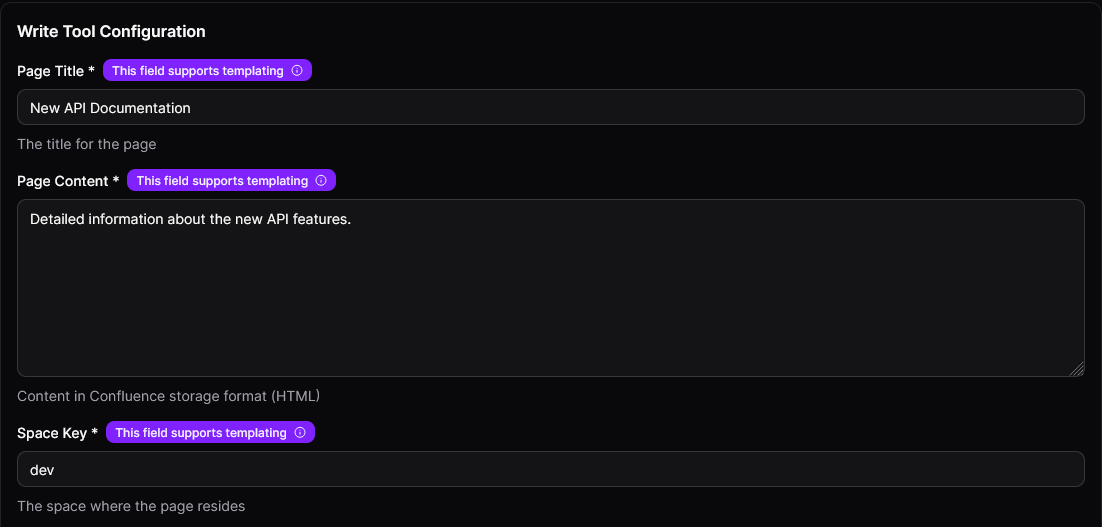
Templates for Dynamic Values
Confluence Tool allows you to use dynamic values in your queries to tailor the behavior of the tool based on user input. Dynamic values are enclosed in double curly braces: {{ variable_name }}.
Dynamic Values in Queries
You can create dynamic search queries, content, and titles that adapt to user input. This allows for more flexibility, as it enables the tool to respond to different inputs rather than using static, hardcoded values.
Search Tool Example
For the Search Tool, dynamic values allow you to build a flexible search query based on user input.
Example:
type:page AND title:"{{page_title}}"
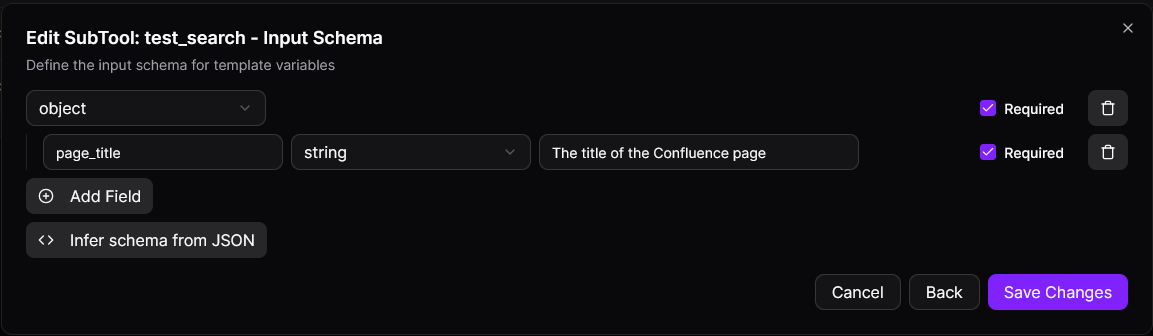
Here:
{{page_title}}is a dynamic value that will be replaced with the title the user provides when they perform the search. This makes the query adaptable to different search terms.
Another example:
type:page AND space:"{{space_key}}" AND title:"{{page_title}}"
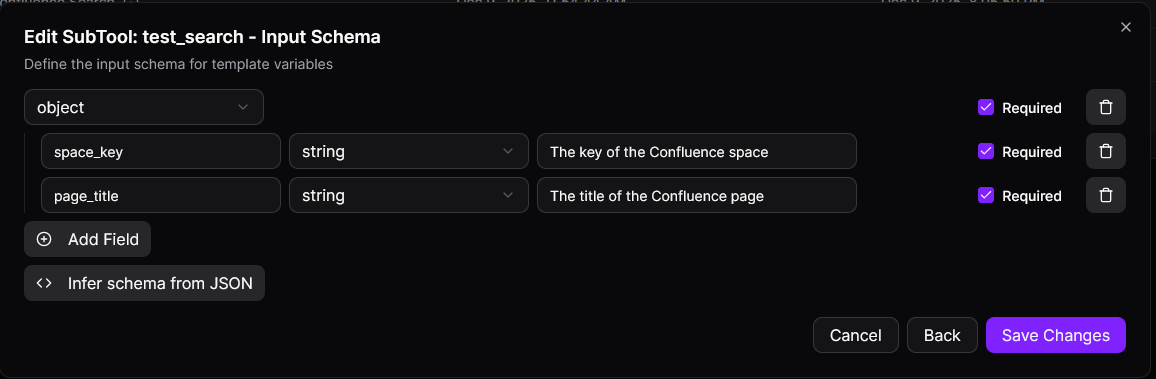
Here:
{{space_key}}will be replaced by the space key the user provides.{{page_title}}will be replaced with the title the user inputs for the search.
Read Tool Example
For the Read Tool, dynamic values are used to retrieve content from specific pages.
Example:
"{{page_id}}"
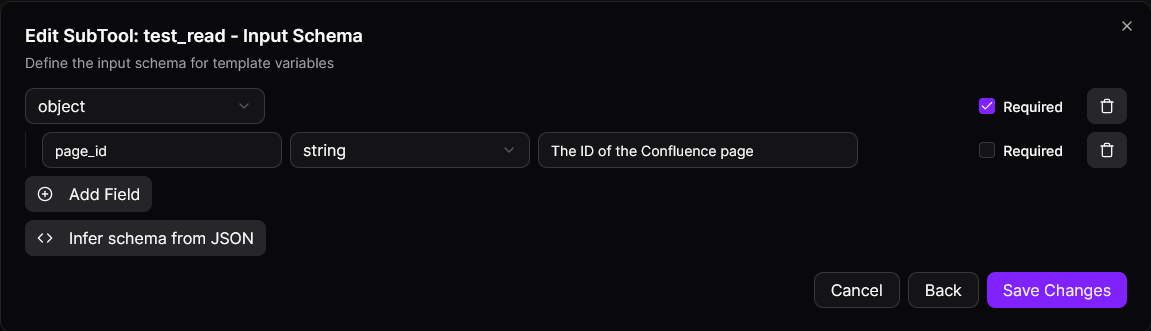
Here:
{{page_id}}will be replaced by the ID of the Confluence page that the user specifies when they want to read the page content.
Write Tool Example
The Write Tool uses dynamic values for creating or updating pages in Confluence. This can include the space, title, and content for the page.
Example:
Here:
space_key: "{{space_key}}"
parent_id: "{{parent_id}}"
page_title: "{{page_title}}"
page_content: "{{page_content}}"
Here:
{{space_key}}will be replaced by the space the user selects or provides.{{page_title}}will be replaced by the title the user provides for the page.{{page_content}}will be replaced with the content the user inputs for the page.{{parent_id}}will be replaced with the parent page's ID if the page is being nested under another page.
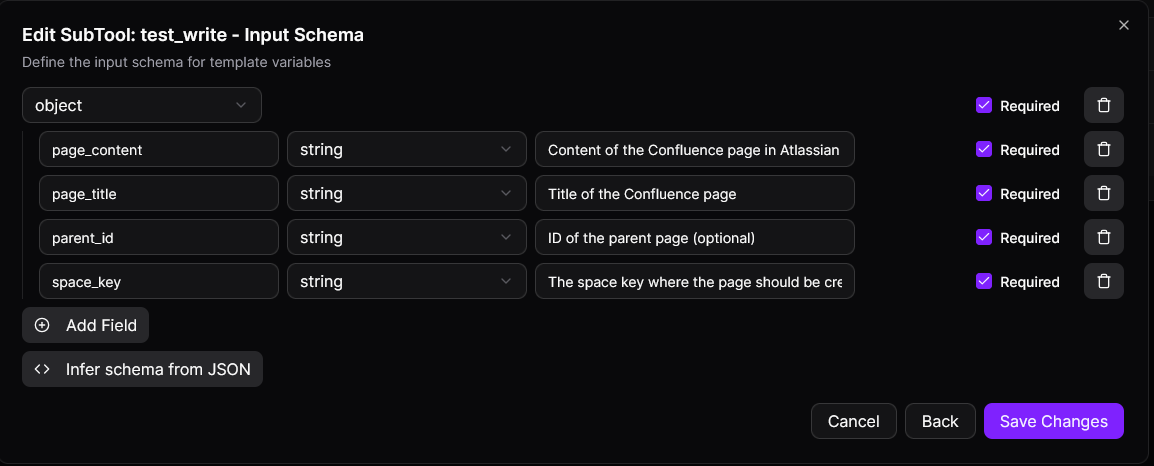
For example, if a user wants to create a page with the title "API Documentation" in the "dev" space, the tool will dynamically insert those values into the configuration.
By using dynamic values, you can make the tool's behavior more responsive to the user's needs, offering greater flexibility when working with Confluence data.
Security Features
Secure OAuth Integration
The Confluence Tool uses OAuth 2.0 for secure authentication, eliminating the need for manual credentials.
Best practices:
- Always use OAuth for secure token management.
- Ensure tokens are stored securely and never exposed to unauthorized users.
- Regularly monitor the status of OAuth tokens to ensure they remain valid.
Common Use Cases
1. Knowledge Base Management
Automate and streamline knowledge base operations:
- Search for documentation across multiple spaces
- Retrieve specific pages for reference or analysis
- Create standardized documentation templates automatically
- Update existing pages with new information programmatically
2. Content Discovery and Search
Find relevant content efficiently:
- Search for pages by keywords, authors, or date ranges
- Filter content by space or content type
- Locate documentation related to specific projects or features
- Build custom search interfaces for Confluence content
3. Automated Documentation
Generate and maintain documentation programmatically:
- Create release notes automatically from deployment data
- Generate API documentation from code annotations
- Update technical specifications based on system changes
- Maintain synchronized documentation across multiple pages
4. Content Migration and Synchronization
Manage content across Confluence instances or external systems:
- Read pages from one space and create them in another
- Synchronize documentation between different systems
- Archive or duplicate content programmatically
- Bulk update pages with consistent formatting or structure
Best Practices
Security
- Always use OAuth 2.0 for authentication rather than API tokens or passwords
- Grant only the minimum required permissions to the integration
- Regularly audit which spaces and pages the integration has access to
- Monitor OAuth token expiration and set up automatic refresh mechanisms
- Revoke integration access immediately if security is compromised
- Use Confluence's audit logs to track integration activity
Performance
- Use specific CQL queries to limit result sets and reduce processing time
- Always set reasonable limit values in search queries to prevent excessive data retrieval
- Cache frequently accessed page content to reduce API calls
- Use space-specific searches rather than global searches when possible
- Optimize CQL queries by filtering on indexed fields (type, space, title)
- Monitor API rate limits and implement backoff strategies
Reliability
- Implement proper error handling for network failures and API errors
- Set up automatic OAuth token refresh to prevent authentication failures
- Test all configurations thoroughly before deploying to production
- Monitor integration health and set up alerts for failures
- Use retry logic with exponential backoff for transient failures
- Validate input parameters before sending requests to Confluence
Content Management
- Use clear, descriptive page titles and content structure
- Leverage parent-child page relationships for organized content hierarchy
- Include metadata and labels for better searchability
- Follow consistent naming conventions for spaces and pages
- Document template variables and their expected formats
- Version control your integration configurations
Additional Resources
- Getting Started with Confluence - Official Confluence user guide and tutorials
- CQL Search Syntax - Learn how to write powerful search queries
- Creating and Editing Pages - Guide to creating and managing pages
Troubleshooting
Authentication Issues
- Ensure that the OAuth authentication process was completed successfully.
- If authentication fails, try re-authenticating by clicking the "Authenticate" button again.
- Confirm the Confluence instance URL is correct and accessible
- Check Confluence admin settings to ensure OAuth apps are allowed
Search Tool Issues
- If no results are returned, double-check the search query syntax.
- Ensure that the limit parameter is set appropriately to prevent overly broad queries.
- Test your CQL query directly in Confluence to isolate syntax errors
- Check if content exists in the specified spaces and matches your query criteria
Read Tool Issues
- Confirm the page_id is correct and the page exists in Confluence
- Verify you have read permissions for the specified page
- Check if the page is in a restricted space that requires additional permissions
- Ensure the page hasn't been deleted or moved to a different space
- Try accessing the page directly in Confluence to confirm it's accessible
- Check if template variables are being replaced correctly with valid page IDs
Write Tool Issues
- Verify you have write permissions for the target space
- Confirm the space_key exists and is spelled correctly
- Check if the parent_id (if provided) is valid and accessible
- Ensure page content format is valid (HTML or storage format)
- Verify that required fields are all provided
- Check Confluence space permissions to ensure the OAuth user can create/edit pages
- Review the API response for specific error messages about content validation