DynamoDB Integration
The DynamoDB integration provides a secure interface between MCP Express and Amazon DynamoDB so AI tools can read and write scoped table data through JSON-RPC. It abstracts request construction and enforces predictable tool contracts for LLM orchestration.
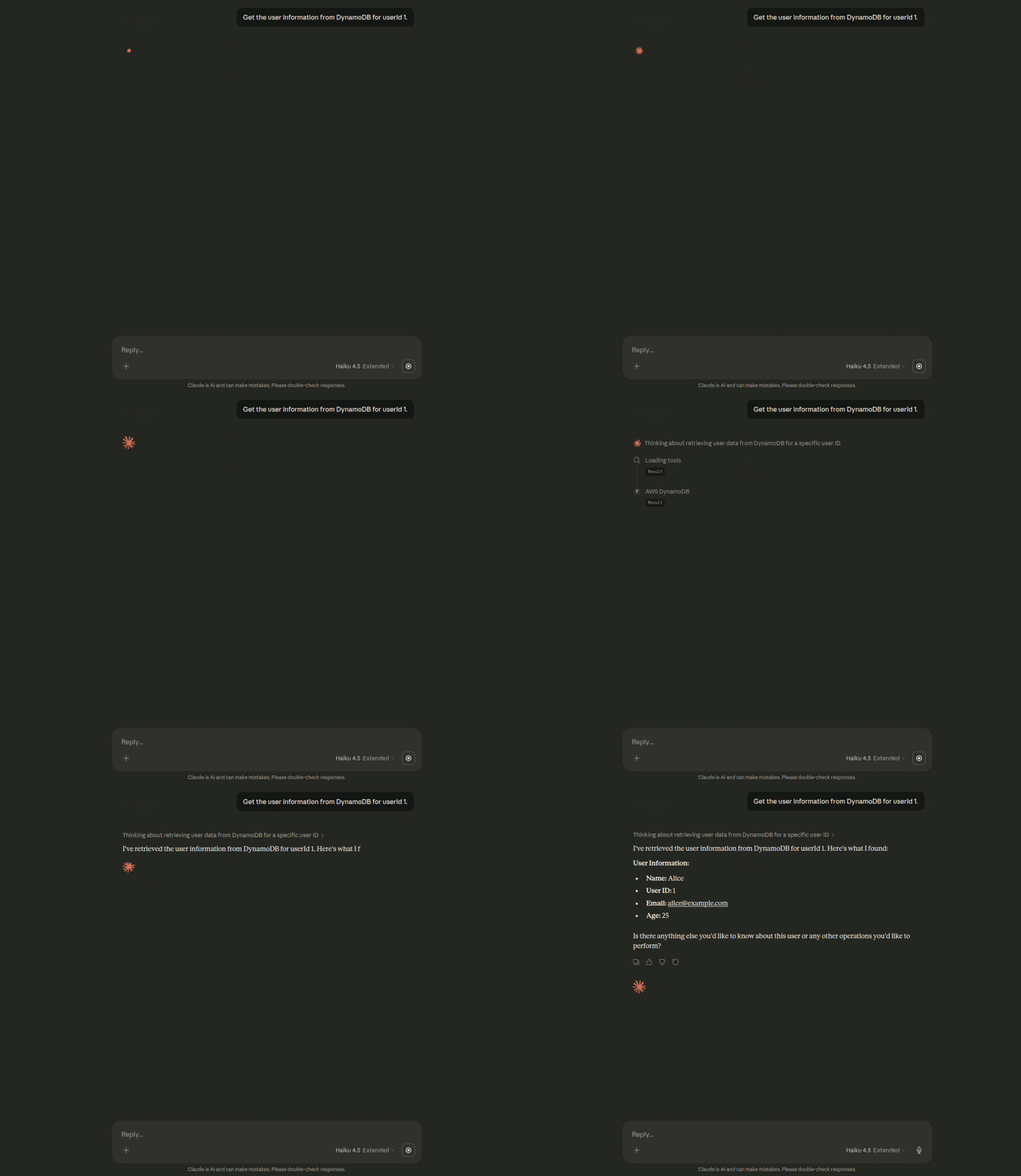
Capabilities
- Key-Based Retrieval: Execute deterministic single-item lookups using partition key templates and validated runtime arguments.
- Controlled Writes: Provision bounded put-item tools for operational workflows such as session persistence and event capture.
- Schema-Aware Tool Contracts: Map expected input and output shapes into MCP tool schemas to reduce ambiguity during model calls.
- Scoped Table Access: Bind each integration to explicit tables and operations to enforce least-privilege boundaries.
Integration
To connect MCP Express to Amazon DynamoDB, configure authentication, target table scope, and execution defaults before tool provisioning. This handshake verifies access and prepares metadata required for reliable request orchestration.
Connection Parameters
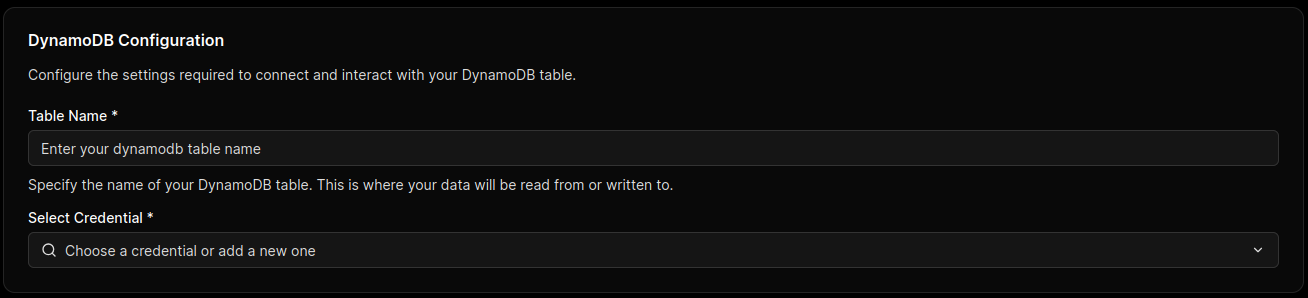
Configure the following fields using a dedicated IAM principal with only required DynamoDB actions and table scope.
| Parameter | Technical Description | Required |
|---|---|---|
| Table Name | Primary DynamoDB table bound to this integration instance. | Yes |
| AWS Access Key ID | Access key identifier when static IAM credentials are used. | Conditional |
| AWS Secret Access Key | Secret key paired with the access key ID for signed requests. | Conditional |
| AWS Region | AWS Region where the target DynamoDB table is hosted. | Yes |
Grant only dynamodb:GetItem and dynamodb:PutItem on approved tables unless broader operations are explicitly required. Avoid wildcard permissions on table resources and actions.
When running in cloud environments, use role-based credentials and secret managers instead of long-lived static keys.
Handshake & Capability Discovery
After connection is submitted, MCP Express executes a validation and preparation flow:
- Credential Validation: Verifies AWS signing and confirms the principal can reach DynamoDB APIs in the selected region.
- Table Access Check: Validates configured table scope and operation permissions for the integration principal.
- Tool Schema Preparation: Initializes request/response mappings used by generated MCP tools for LLM execution.
Configuration
Once the DynamoDB connection is validated, configuration defines how MCP Express exposes DynamoDB operations as callable tools. For this integration, the model is action-based and focused on deterministic Get Item and Put Item execution paths.
Tool Orchestration
MCP Express maps DynamoDB operations into tool contracts with explicit runtime inputs and validation rules. You choose an operation (get or put) and configure only the parameters required for that action.
Action Configuration
Use Action Configuration for standard DynamoDB tools created directly from integration fields.
How It Works
- Select Operation: Choose
getorputfor the tool. - Define Table Scope: Bind the tool to the DynamoDB table configured during integration setup.
- Configure Action Inputs: Apply required fields for the selected operation.
- Validate Execution: Test with representative runtime values before enabling the tool.
Supported Actions
- Get Item: Retrieve a specific item by primary key.
- Put Item: Store a complete item payload for create or replace workflows.
Action Details
This section describes the required configuration for each supported action and how runtime values are resolved.
Get Item Parameters
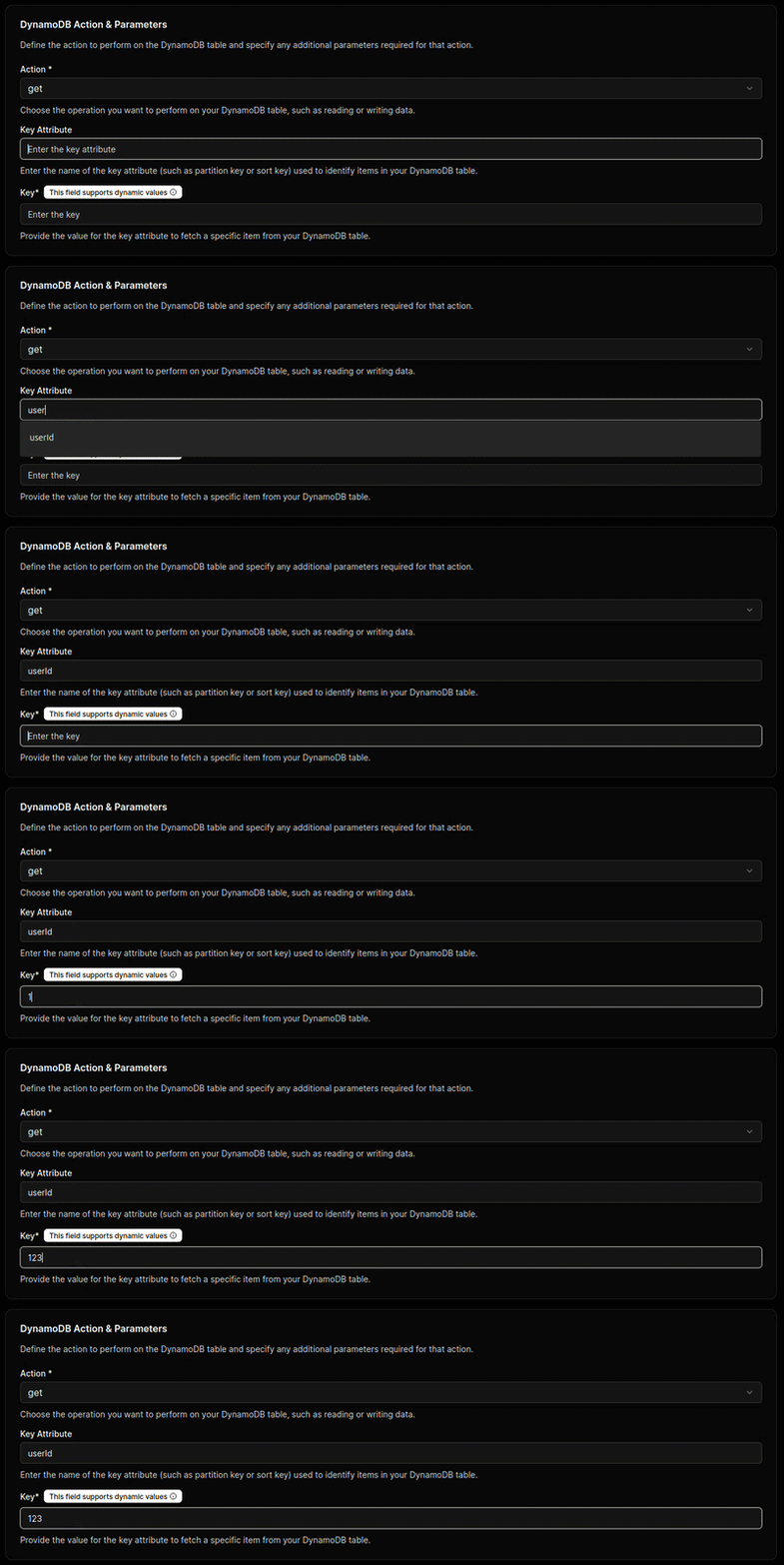
Use this action when the tool must retrieve one item by key.
| Parameter | Required | Description | Supports Templates |
|---|---|---|---|
| Key Attribute | Yes | The attribute name used as the table primary key. | No |
| Key | Yes | The key value used to locate the item. | Yes ({{ }} syntax) |
Example behavior
- If
Key AttributeisidandKeyis{{userId}}, the integration resolvesuserIdat runtime and retrieves the matching item. - If
Keyis fixed (for example,abc-123-xyz), the tool always fetches that record.
Put Item Parameters
Use this action when the tool must write the full input item to DynamoDB.

- No extra action configuration fields are required.
- The tool writes the full item payload it receives at runtime.
- This is suitable for create or replace workflows where the caller provides a complete object.
Governance Controls
Use strict input validation to enforce primary key requirements and expected attribute types. Combine tool-level validation with IAM table-level permissions to keep reads and writes scoped to approved tables.
Use the built-in testing utility to verify key resolution ({{ }} substitution), required attribute presence, and permission behavior for both get paths before production rollout.
Security & Patterns
This section defines operational guardrails for running DynamoDB-backed MCP tools in production. Apply these controls to reduce data exposure risk, prevent unsafe execution paths, and maintain predictable latency.
Transaction Guardrails (Restricted Operations)
DynamoDB tool definitions should explicitly restrict high-risk operations and mutation scope. In most deployments, only deterministic key-based reads and bounded writes should be enabled.
Allowing unconstrained runtime selection of operations, table names, or request payloads can lead to unauthorized access patterns or unintended data mutation. Enforce allowlists for operations and table targets.
Fully Dynamic AI Queries
A fully dynamic mode can allow the model to construct request payloads at runtime for broader analytical flexibility. This mode increases operational risk because request shape, target attributes, and write behavior may vary per prompt.
Do not enable fully dynamic request generation in production unless strict IAM policies, schema validation, operation allowlists, and output redaction are all enforced.
Data Governance & Scopes
- Enforce least privilege with IAM policies scoped to explicit tables and actions.
- Restrict attribute exposure using projection and response shaping before model delivery.
- Separate read and write tools to keep audit boundaries clear.
- Store credentials in managed secret stores and rotate them on a defined schedule.
- Apply request validation for all template variables before DynamoDB execution.
Performance Optimization
| Pattern | Description | Benefit |
|---|---|---|
| Partition-Key Access | Design tools around partition-key lookups and avoid broad scans. | Delivers low-latency, predictable responses for MCP calls. |
| Projection Expressions | Return only required attributes for each tool response. | Reduces payload size and model context overhead. |
| Conditional Writes | Add conditions to write paths for idempotency and conflict control. | Prevents accidental overwrites and improves data consistency. |
| Timeout and Retry Policy | Use bounded retries with exponential backoff for transient failures. | Improves resilience without creating runaway execution. |
Protocol Limitations
- Large item payloads can reduce model response quality and should be constrained by projection.
- Complex relational joins are not native to DynamoDB and must be modeled at application or tool orchestration level.
- Scan-heavy patterns are expensive and can exceed latency targets for conversational interactions.
- Eventual consistency behavior may require explicit consistency settings for critical reads.