MS SQL Server Integration
The MS SQL Server integration provides a secure, schema-validated interface between your LLM and your database instances. It abstracts the database driver layer, enabling AI agents to perform data retrieval and analysis within the bounds of your defined governance.
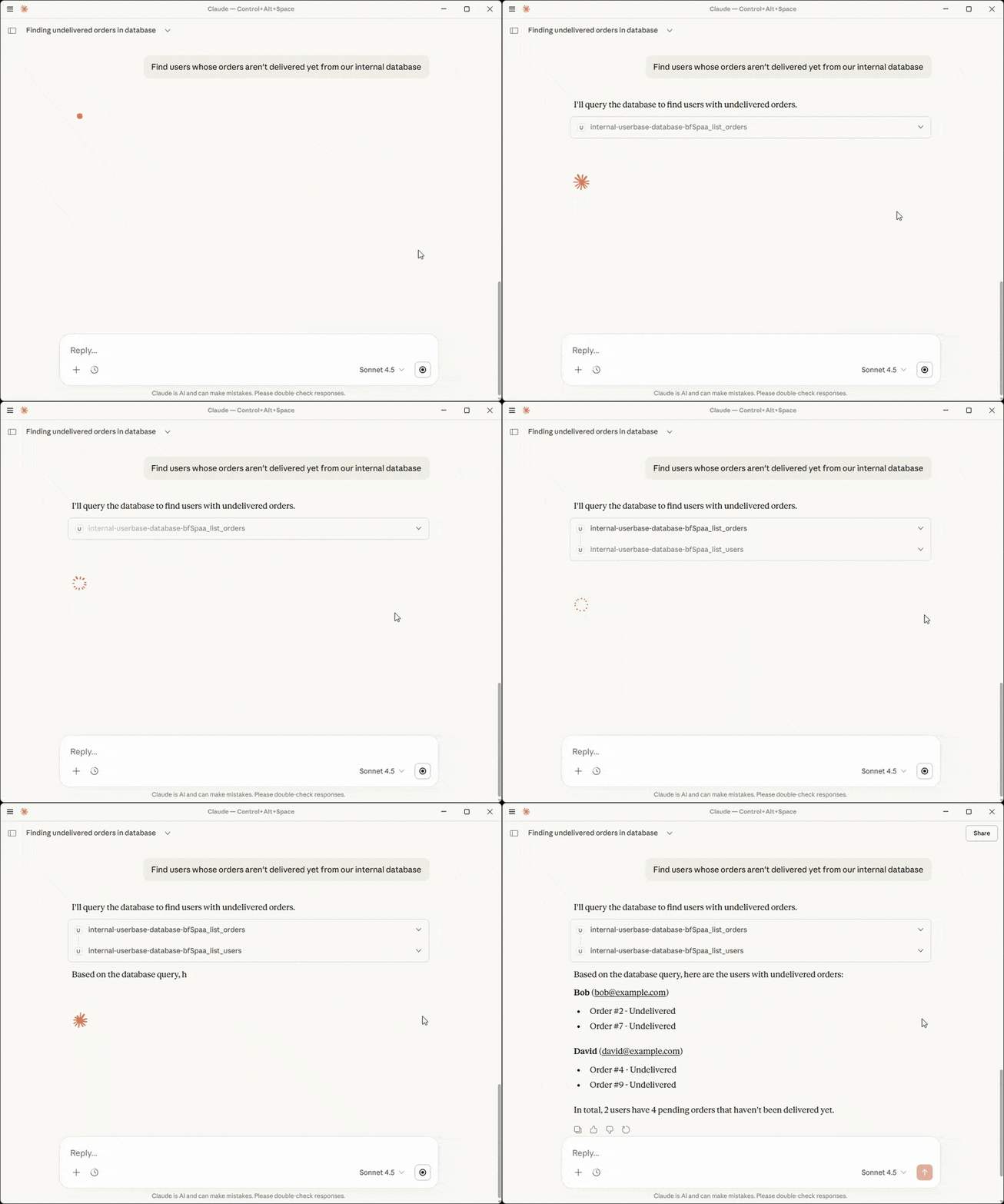
Capabilities
- SQL Templating & Dynamic Variables: Admins can define rigid SQL structures that accept dynamic parameters from the LLM. This enables granular control, such as restricting access to specific rows (e.g., WHERE status = 'released').
- Granular Schema Exposure: Provision read-only access to specific tables while enforcing column-level redaction for sensitive data like PII or credentials.
- Automated Schema Inference: High-fidelity mapping of MS SQL Server data types to JSON-RPC tool definitions, ensuring the LLM understands your data structure.
Integration
To interface your MCP server with an MS SQL Server instance, you must define the connection parameters and establish a secure handshake. This process ensures the server can successfully orchestrate query execution and schema inference.
Connection Parameters
Configure the following fields to authorize the MCP server's access to your database. Use a dedicated service account with limited privileges to maintain strict data governance.
| Parameter | Technical Description | Required |
|---|---|---|
| Database Host | The server address or IP where the database resides. | Yes |
| Port | The communication port (Default: 1433). | Yes |
| Database Name | The name of the SQL Server database to be indexed. | Yes |
| Credentials | The Username and Password for authentication. | Yes |
| Timeout | Duration (seconds) before a connection terminates. | Optional (Default: 10) |
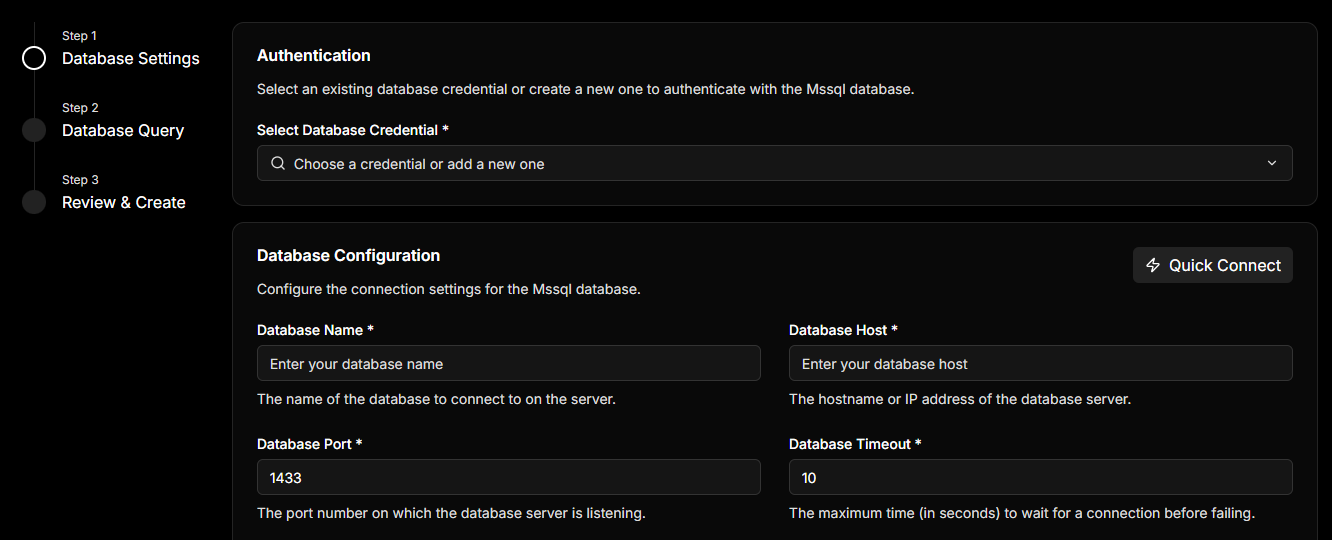
Ensure the database user has access to the required tables and permissions to perform the needed operations.
If you have an MS SQL Server connection URI (e.g., mssql://user:pass@host:1433/db), use the Quick Connect toggle. This automatically parses and populates all required fields in a single step.
Handshake & Schema Discovery
Once you click Next, the MCP server initiates an automated validation sequence:
- Connection Test: Validates the network path and credentials.
- Schema Discovery: Queries the database to identify all available tables.
- Inference Engine: Prepares the initial data mappings for your configuration.
If the connection fails, the system will provide an error message to help you troubleshoot.
Configuration
Once your database is connected, the Configuration layer defines how the LLM interfaces with your data. This is where you transform raw database tables into functional Tools that an AI assistant can invoke.
Tool Orchestration
The MCP server abstracts complex SQL operations into simple tool definitions. You have two primary methods for defining these interfaces: the Guided Query Editor and the Custom SQL Editor.
Guided Query Editor (No-Code)
The Guided Editor is the most frictionless way to expose database actions. After the initial schema discovery, the editor loads your available tables and allows you to provision specific actions without writing a single line of SQL.
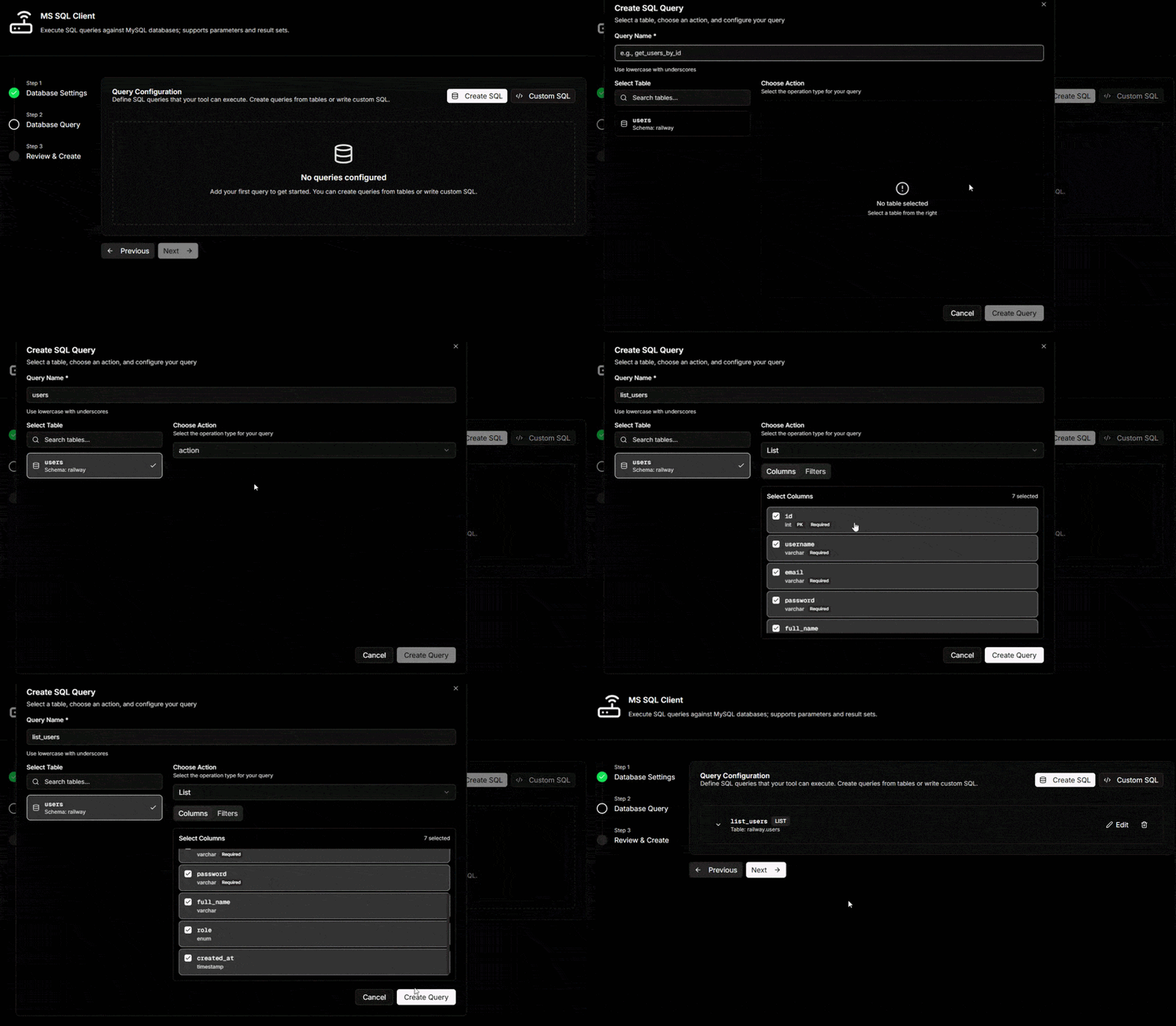
How it works:
- Select Tables: Choose from the list of synced tables discovered during the handshake.
- Pre-defined Actions: Select from common query patterns like List Entries, Get Single Entry, or Update Record.
- Column Selection: Specify exactly which columns to include or exclude from the LLM's view.
- Zero Manual SQL: The system automatically generates the underlying SQL and JSON-RPC schema.
Supported Actions:
- List Entries: Retrieve multiple rows based on filtered criteria.
- Get Single Entry: Fetch a specific record via a unique identifier.
- Mutation Operations: Enable Insert, Update, or Delete capabilities for specific tables.
Data Redaction:
For "Get" and "List" operations, you can explicitly define which columns are exposed to the LLM. This ensures sensitive fields (e.g., password_hash) are never transmitted in the Model Context Protocol lifecycle.
Custom SQL Editor (Advanced)
The Custom SQL Editor allows you to define precise tool behavior for complex use cases involving JOINs or aggregations. When using this editor, you have two primary options for how to define your queries.
Fixed SQL Statements
Use this to create specialized, immutable tools. A Fixed SQL statement executes the exact same query every time it is called. This is ideal for summary reports or "Latest Status" checks where no external input is required from the LLM. Example:
SELECT TOP 50 * FROM orders WHERE status = 'pending';
Dynamic Query Templating
The editor supports Handlebars-style placeholders ({{argument_name}}). This enables the LLM to pass runtime parameters into a static SQL structure, ensuring the query remains secure and scoped to specific business rules.
SELECT order_id, product, amount, created_at
FROM orders
WHERE user_id = {{user_id}}
AND status = 'released'
ORDER BY created_at DESC
You can validate your tool definitions instantly using the built-in Testing Tool. This allows you to verify that the LLM receives the expected JSON-RPC response before deploying the server.
Security & Patterns
This section outlines the protocols and guardrails that ensure your MS SQL Server integration remains secure, performant, and compliant with enterprise data governance standards.
Transaction Guardrails (Restricted Keywords)
To prevent unauthorized schema modifications or data loss, the MCP server employs a server-side validator that intercepts SQL execution. By default, high-risk keywords are restricted. Default Restricted Keywords
The following operations are blocked unless explicitly authorized in the Advanced Settings of your tool configuration: - DROP, TRUNCATE, DELETE, ALTER, GRANT, REVOKE
When using the {{query}} parameter to allow the LLM to generate SQL, these guardrails are your primary line of defense against prompt injection or unintended data destructive actions.
Fully Dynamic AI Queries
The special {{query}} argument authorizes your AI assistant to architect and execute SQL dynamically based on natural language prompts. Instead of a fixed query with static placeholders, the entire SQL statement is generated at runtime by the AI.
Use Case Example: If a user asks, "Show me the top 5 customers by revenue this month," and no pre-defined tool exists for that specific request, the AI constructs and executes the appropriate SELECT and ORDER BY logic automatically. This provides maximum flexibility for exploratory data analysis.
While {{query}} unlocks significant flexibility, it is a high-privilege feature. It is strongly discouraged for use in production environments unless you have strictly configured Restricted Keywords and verified that the database user role has limited permissions.
Data Governance & Scopes
The MCP server adheres to the principle of least privilege. To ensure robust data security, implement the following patterns:
- Column-Level Redaction: Use the Guided Query Editor to exclude PII (Personally Identifiable Information) from the LLM's context.
- Row-Level Security (RLS): We recommend provisioning an MS SQL Server user with appropriate security policies. This ensures that even if an LLM generates a broad query, it can only access rows permitted by its database role.
- Read-Only Replicas: For analytics use cases, connect the MCP server to a read-only replica to eliminate the risk of accidental data mutation.
Performance Optimization
To ensure the LLM receives responses within the JSON-RPC timeout window (typically 30 seconds), follow these implementation patterns:
| Pattern | Description | Benefit |
|---|---|---|
| Indexing | Ensure all columns used in WHERE clauses of Custom SQL are indexed. | Reduces execution latency. |
| Limit Clauses | Always include a TOP (e.g., TOP 100) in Fixed SQL statements. | Prevents LLM context window overflow. |
| Filtering | Use {{argument}} templates to force the LLM to provide specific IDs. | Minimizes full table scans. |
Protocol Limitations
While the Model Context Protocol is highly extensible, users should be aware of the following MS SQL Server-specific constraints:
- Binary Data: Large BLOBs or binary data types are not natively rendered in the chat interface and should be excluded from queries.
- Long-Running Transactions: Queries exceeding the configured Database Timeout will be terminated to preserve server resources.