MS SQL Server Integration
To interface your MCP server with an MS SQL Server instance, you must define the connection parameters and establish a secure handshake. This process ensures the server can successfully orchestrate query execution and schema inference.
Connection Parameters
Configure the following fields to authorize the MCP server's access to your database. Use a dedicated service account with limited privileges to maintain strict data governance.
| Parameter | Technical Description | Required |
|---|---|---|
| Database Host | The server address or IP where the database resides. | Yes |
| Port | The communication port (Default: 1433). | Yes |
| Database Name | The name of the SQL Server database to be indexed. | Yes |
| Credentials | The Username and Password for authentication. | Yes |
| Timeout | Duration (seconds) before a connection terminates. | Optional (Default: 10) |
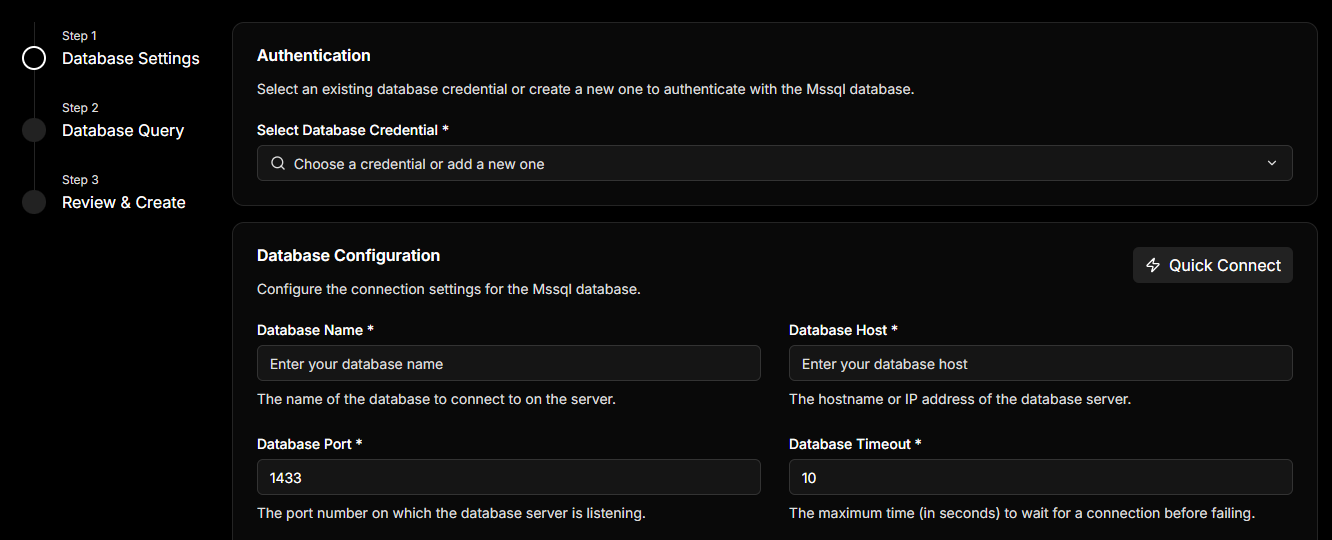
Ensure the database user has access to the required tables and permissions to perform the needed operations.
If you have an MS SQL Server connection URI (e.g., mssql://user:pass@host:1433/db), use the Quick Connect toggle. This automatically parses and populates all required fields in a single step.
Handshake & Schema Discovery
Once you click Next, the MCP server initiates an automated validation sequence:
- Connection Test: Validates the network path and credentials.
- Schema Discovery: Queries the database to identify all available tables.
- Inference Engine: Prepares the initial data mappings for your configuration.
If the connection fails, the system will provide an error message to help you troubleshoot.