Role-Based Access Control (RBAC)
Role-Based Access Control (RBAC) in MCP Express provides a structured, auditable mechanism for managing tool-level access within servers. Permissions are granted through roles assigned to members, resulting in a model that is explicit, deterministic, and maintainable at scale.
Overview
Role-Based Access Control (RBAC) in MCP Express allows you to control which tools members can access within a server. Access is managed by assigning roles to members. Each role defines the set of tools a member is allowed to use.
- Server-scoped access control: Access is isolated to each server. Roles and permissions are defined and enforced independently per server.
- Role-based tool access: Roles act as containers for tool access, determining which tools a member can interact with.
- Explicit permission model: Members can only access tools that are explicitly included in their assigned roles.
A member can only use tools that are explicitly allowed by their assigned roles.
Access Model
MCP Express follows a minimal and explicit access model designed for clarity and predictability. Access decisions are made at the tool level and enforced consistently across all requests.
- Per-request, tool-level evaluation: Access is evaluated on every request and scoped strictly to individual tools. There is no cached or assumed permission state.
- Binary access control: Permissions are absolute. A member either has access to a tool or does not, with no intermediate states.
- Explicit role-based permissions: All access is granted through roles. There are no implicit permissions, inheritance, or hierarchical access structures.
MCP Express does not support read, write, or scoped permission levels. Access control is strictly based on whether a tool is allowed or not.
Core Components
-
Server: The server defines the boundary for access control. It isolates roles, members, and tools from other servers, preventing cross-server permission leaks.
-
Tools: Tools are the functional units members can interact with. Access is never granted directly and is always mediated through roles, making tools the smallest unit of access control.
-
Roles: Roles group tool permissions within a single server. Each role can be assigned to multiple members, and any changes take effect immediately. Design roles around tool usage rather than job titles to ensure predictability.
-
Members: Members are users within a server. Each member can have only one role per server, and access is strictly limited to the tools included in that role. There is no implicit or cumulative access.
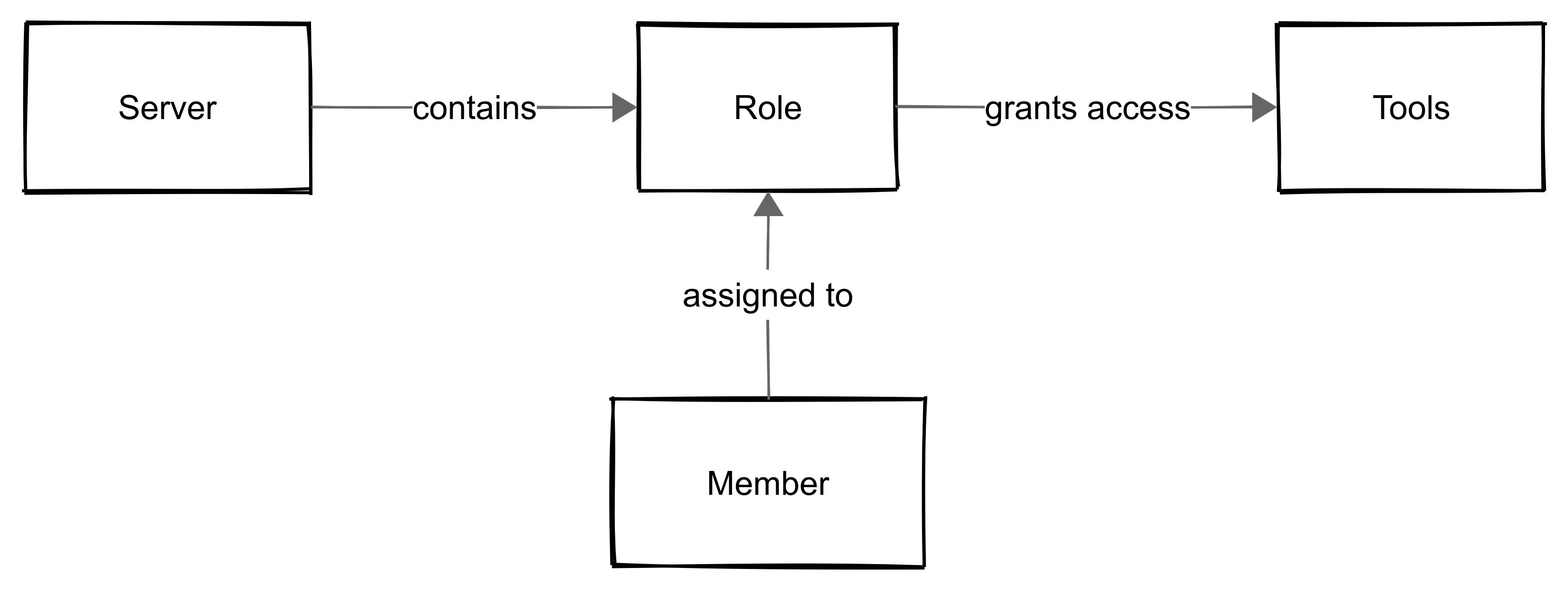
Each member can have only a single role per server. This ensures access remains predictable, auditable, and avoids conflicts. Assign roles thoughtfully to maintain clear responsibility and simplify access management.
Setting Up Roles and Member Access
Managing roles and assigning them to members is central to controlling access in MCP Express. Properly defining roles ensures that team members can only access the tools they need, keeping your server secure, predictable, and auditable.
Only admins of the organization can create roles or assign them to members. Ensure you have the required permissions before performing these actions.
Follow the steps below to create roles and assign them to members.
Step 1: Create a Role
-
Navigate to your server and open Manage Access.
-
Click Create Role.
-
Define the role name, role description, and select the tools that members assigned to this role can access.
-
Save the role. Changes take effect immediately.
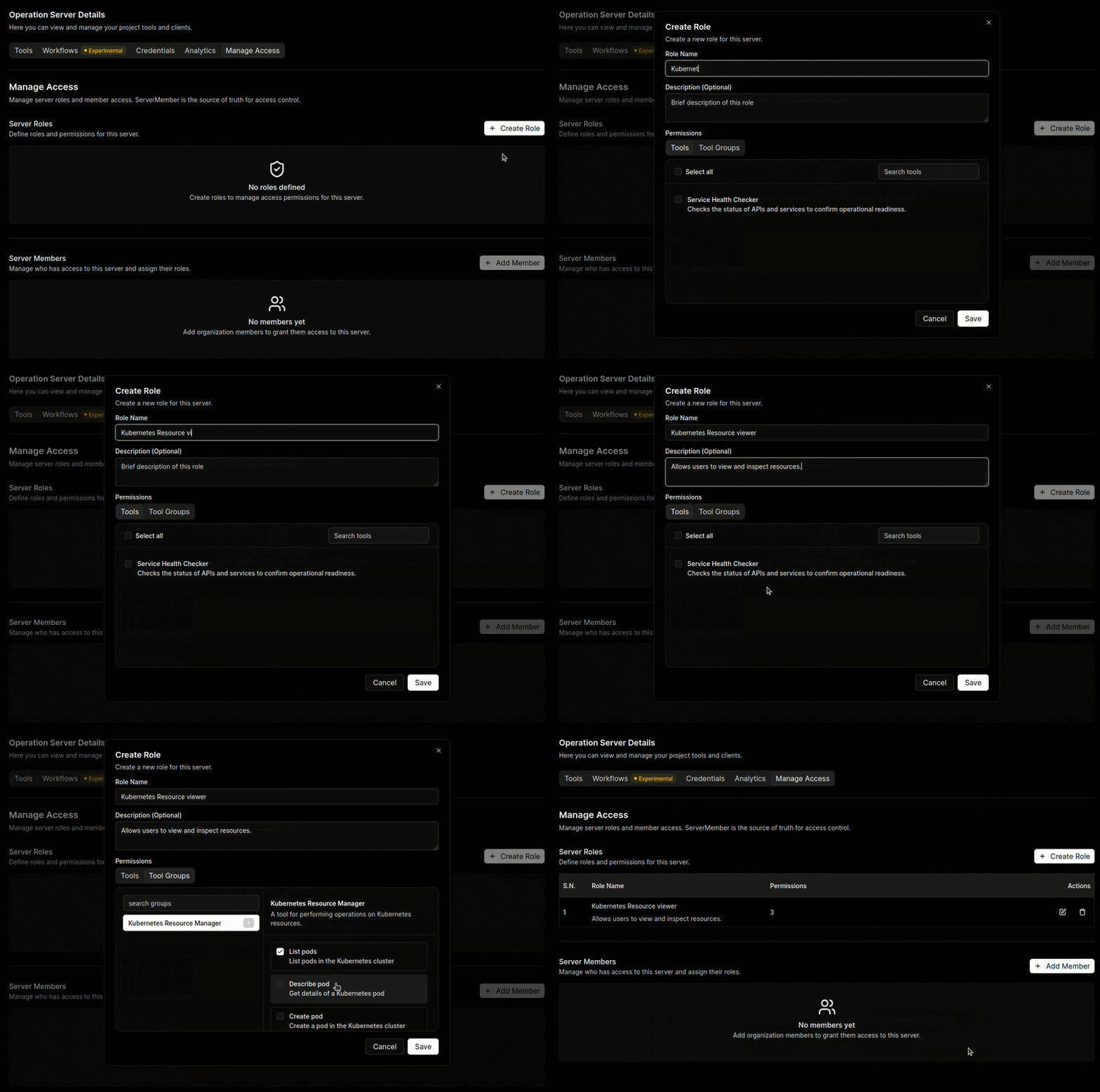
Design roles based on tool usage rather than job titles. Focus on the tools a member truly needs to perform their tasks. This approach keeps access predictable, auditable, and aligned with responsibilities, while also making future role reviews and audits simpler.
Step 2: Assign Role to a Member
-
In Manage Access, select the member you want to assign.
-
Choose the appropriate role from the list. Remember, each member can have only one role per server.
-
Confirm the assignment. The member now has access only to tools allowed by the role.
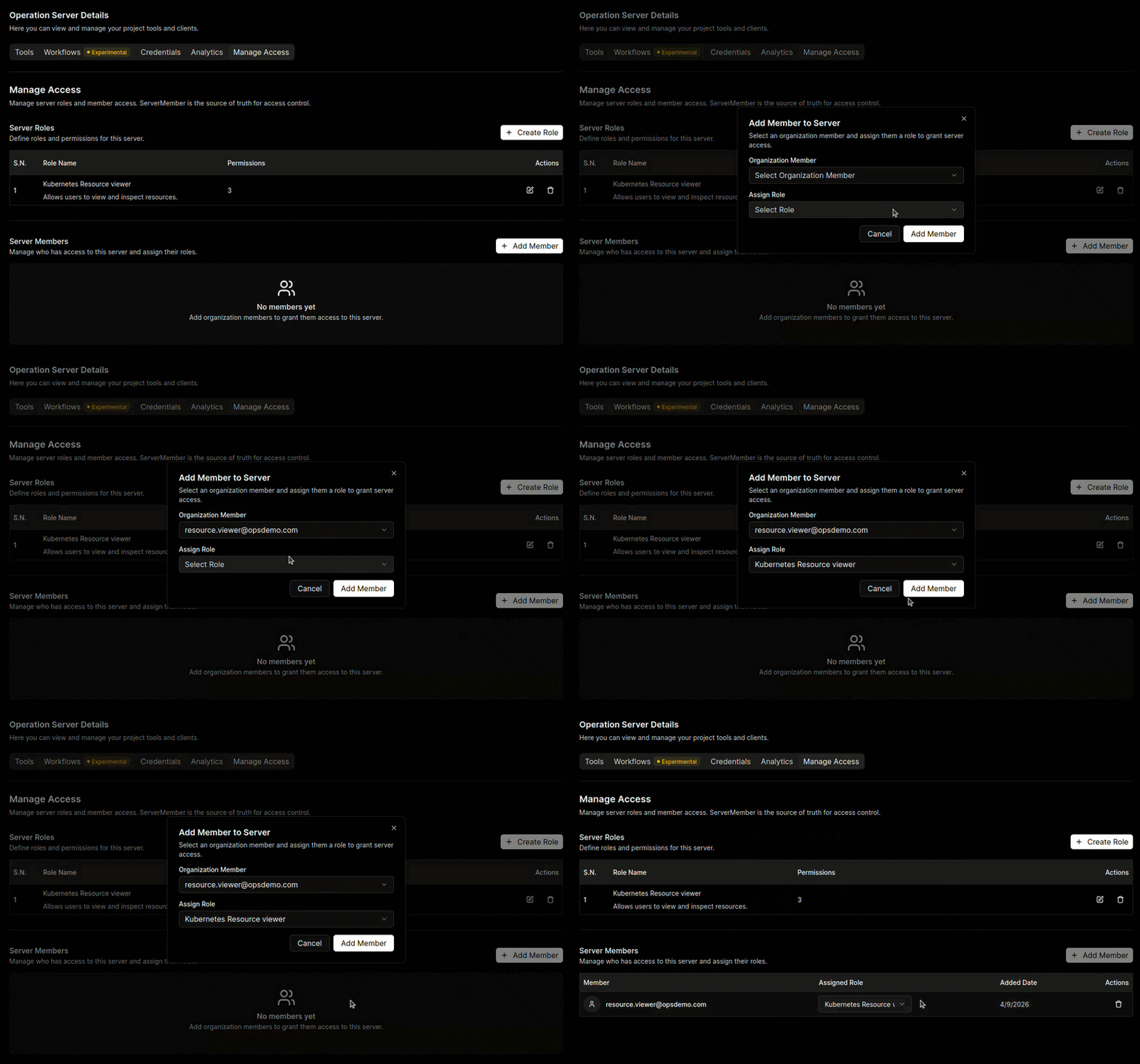
Always review role assignments after creating new roles or adding members. Proper assignment prevents conflicts, ensures clear accountability, and makes it easy to identify gaps or unnecessary access during periodic audits. Regular reviews help maintain a secure and organized server environment.
Example Scenario: Role-Based Access in Action
Consider a server in MCP Express with tools assigned for specific functional areas:
- Developer Role: Access to development tools only
- Finance Role: Access to finance tools only
- Support Role: Access to customer support tools only
Scenario:
Without explicit role assignments, team members could inadvertently access tools outside their responsibilities, increasing operational risk and creating potential for errors. By implementing RBAC:
- Developers are restricted to development tools, preventing unintended modifications in financial or support workflows.
- Finance staff can only access financial tools, safeguarding sensitive financial data.
- Support members access only customer support tools, maintaining operational focus and avoiding conflicts with other teams.
Outcome:
- Access is controlled, predictable, and aligned with team responsibilities.
- Overlap occurs only when explicitly configured, supporting clear separation of duties.
- Administrators can audit roles and permissions efficiently, maintaining compliance and accountability.
Best Practices
- Apply Least Privilege: Grant access only to the tools a role genuinely requires.
- Keep Roles Focused: Avoid grouping unrelated tools in one role.
- Standardize Role Design: Maintain consistent naming and scoping conventions.
- Review Access Periodically: Remove unused roles and revoke outdated permissions.
Neglecting best practices can lead to permission sprawl, unintended access, and potential security risks. Always follow a structured approach to maintain control.
Periodically review role assignments to maintain clear accountability, prevent unnecessary access, and catch outdated or misassigned permissions. This practice ensures a secure, organized, and reliable server environment for all teams.
Summary
RBAC in MCP Express provides a clear, maintainable, and predictable framework for controlling access at the tool level within each server. Roles group tool permissions into structured units, and members acquire access solely through their assigned role. This approach ensures consistent enforcement, minimizes operational risk, and supports efficient auditing and compliance.
For any issues or questions related to RBAC, please contact our support team at MCP Express Support for assistance.